

The term "AI" appears in nearly every bin picking product sheet on the market today. It rarely comes with an explanation of what the AI is actually doing, how it was trained, or what that means for deployment timelines and long-term maintenance. That gap makes it harder than it should be to compare systems on their technical merits.
What follows is a practical breakdown of the three main approaches to training a bin picking AI model — what each involves, where each fits, and what separates a flexible system from one that locks an operation into a single workflow.
For a broader overview of bin picking systems and what makes them work, Eureka's field guide for engineers covers the fundamentals. For a deeper look at what machine learning actually does inside a modern picking system, the companion piece on machine learning in bin picking is a good starting point.
What the AI is actually doing
A vision-guided bin picking system has to solve two distinct problems.
First, vision: figuring out where the parts are, what orientation they're in, and where the robot should grip or suction.
Second, motion: planning and executing the physical movement to pick the part and place it at the destination.
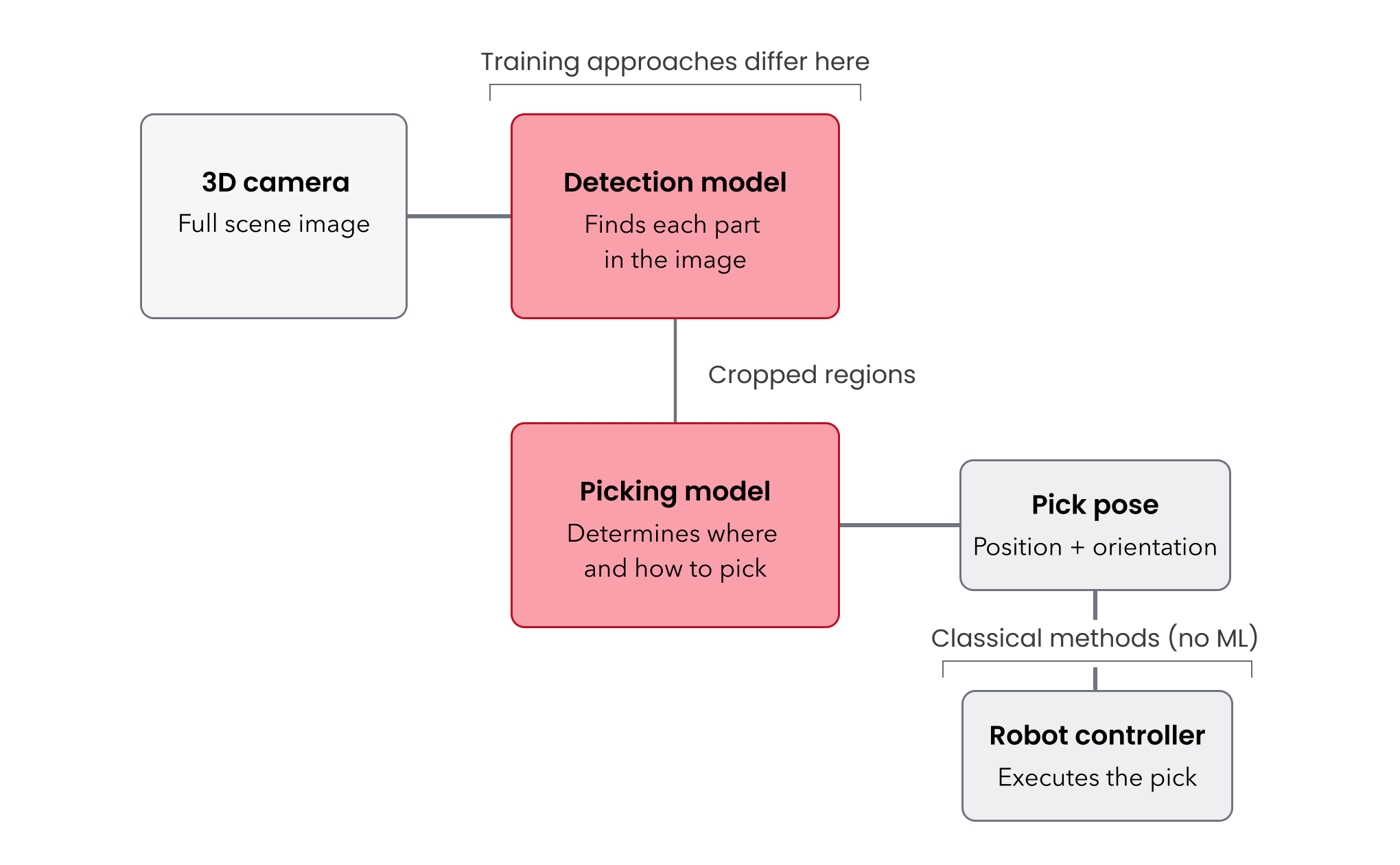
Machine learning is primarily valuable on the vision side. For motion planning, classical methods — the kind that have powered industrial robots for decades — remain more reliable and efficient in this context. That distinction matters when evaluating vendor claims. A system described as "AI-powered" may be using ML only for vision, only for motion, or for both, and the implications for performance and maintainability differ significantly.
Two models working in sequence. On the vision side, most modern systems run two AI models. The first identifies and locates individual parts in the image captured by a 3D camera. The second determines how each part should be picked (the position and direction the robot should approach from). The three training approaches described below differ primarily in how the data for these two models gets generated.
Three approaches to training
Not every part demands the same training methodology, and a good vendor should be able to explain which method applies to a given application and why.
Some vendors in the bin picking space rely exclusively on CAD-based methods, meaning they need a customer's CAD files before they can do anything.
Eureka has developed three distinct approaches, including a pre-trained Masterless Model that requires zero training, an annotation-based workflow that does not require CAD data, and a CAD-based approach.
Having all three means the approach can be matched to the application rather than forcing every project through the same pipeline. Let’s review each approach.
1. Masterless (registration-free) picking: zero training required
What it is. Two foundational AI models (detection model + picking model) pre-trained on millions of objects across a broad range of categories: industrial parts, consumer products, packaging, and more. It can recognize and pick generic objects without ever having seen the specific part in question and without any setup from the customer or integrator. This is why it's also referred to as "registration-free".
Where it fits. Parts with simple, distinct shapes. Sorting applications where parts go into different output bins but don't require precise placement. High-mix scenarios where the incoming parts are unpredictable.
Where it falls short. The masterless model isn’t able to place parts precisely. Applications requiring parts placed in a specific direction or seated precisely in a fixture require a CAD-based or annotation-based approach.
2. CAD-based training: synthetic data from a 3D model
What it is. A training method that uses the part's CAD file to generate synthetic images automatically, producing a large annotated dataset with minimal manual effort.
How it works in practice. A simulation tool takes the 3D CAD model and drops virtual parts into a virtual bin, varying the quantity, lighting conditions, background textures, and camera noise to produce hundreds of realistic rendered images.
Because the tool knows exactly where every part sits in the simulated scene, it generates the annotation data automatically — no one has to outline parts by hand. The engineer's hands-on time is mostly spent configuring simulation parameters: how many parts in the bin, what lighting range to cover, and how much noise to introduce.
Where it fits. If an accurate CAD model can be provided, this tends to be the most reliable and least resource-intensive approach to training a picking model.
Where it falls short. Two scenarios cause problems. First, if an accurate CAD model doesn't exist — legacy parts, supplier components with undocumented variation, or machined parts where as-built dimensions drift from the drawing.
Second, if the gap between the synthetic renders and real camera images is too large. Projects where the renders come out too clean while the real-world images show noisy surfaces, oil residue, or inconsistent lighting can produce models that underperform on the factory floor. When the simulation can't faithfully replicate what the camera actually sees, the model trained on that data won't transfer well.
3. Annotation-based training: teaching the model from real images
What it is. A training method that works directly from camera images of the actual parts, with a human annotating those images to teach the model what to look for.
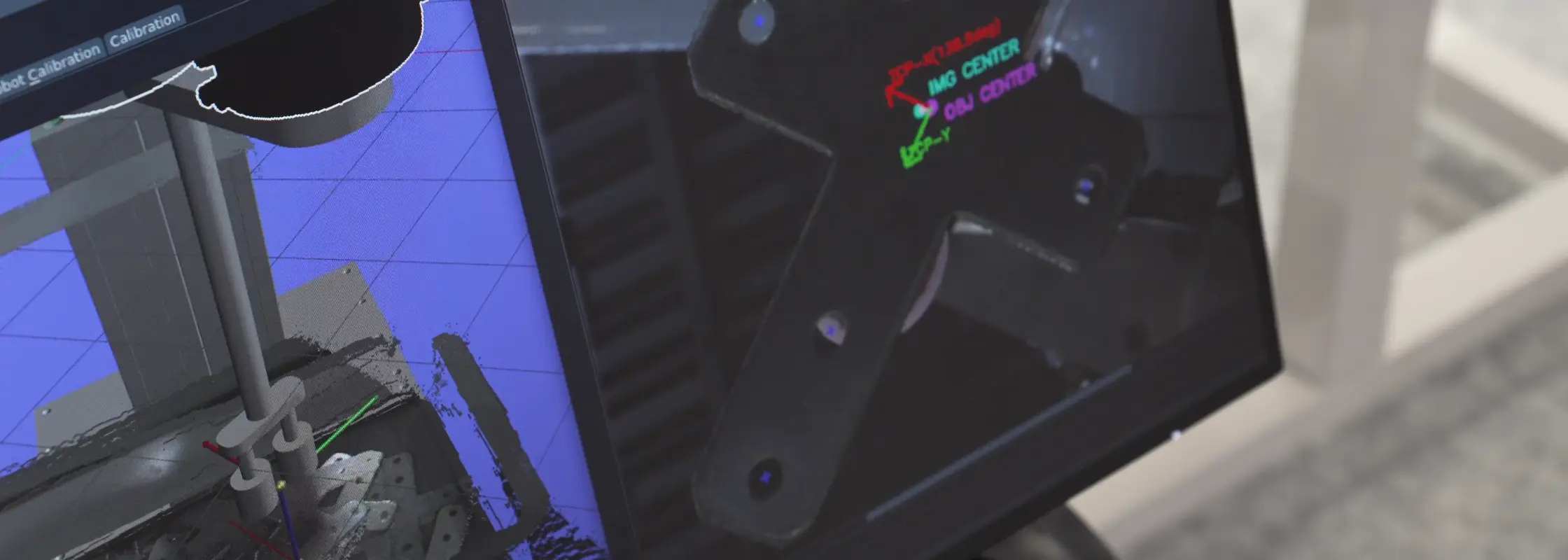
How it works in practice. An engineer captures 30 to 50 images of the parts in the bin—representative of production conditions—and annotates them in Eureka's ML Studio. The annotation process involves outlining each part using a smart segmentation tool that traces boundaries between parts automatically after a single click, then labeling what's been outlined. The picking model also needs to be trained: for each part, an engineer annotates how the robot should approach and pick it.
The reality of annotation work. It isn't conceptually difficult. But it is time-consuming, and the quality of the annotations directly determines the quality of the resulting model. It's the kind of work nobody enjoys, but it's foundational. Cutting corners here shows up in pick reliability later.
Where it fits. Parts without usable CAD data. Parts where surface characteristics — texture, reflectivity, contamination, color — are difficult to replicate in a synthetic rendering environment. Legacy components, supplier parts, or any situation where the as-built part differs meaningfully from a 3D model.
Choosing the right approach
There's no rigid decision tree. In practice, the selection involves engineering judgment, and Eureka's team often starts with the simplest viable approach and escalates only where the application demands it. A reasonable sequence:
- Try masterless (registration-free) first.
- If the application requires precise placement or the geometry is complex and good CAD exists, move to CAD-based training.
- If CAD data isn't available or the real-world imaging conditions are difficult to simulate, use annotation-based training with real images.
| Masterless | CAD-based | Annotation-based | |
|---|---|---|---|
| How it works | Pre-trained foundational model | Synthetic data from 3D model | Trained on real camera images |
| Training effort | None | Low | Moderate |
| Time to first pick | Hours | 1–2 days | 1–2 days |
| CAD file required | No | Yes | No |
| Part complexity | Simple, distinct geometries | Moderate to complex | Moderate to complex |
| Placement precision | Bulk placement | Precise placement and orientation | Precise placement and orientation |
For a walkthrough of how the full system comes together from unboxing to first pick, Eureka's setup guide covers the process end to end. For guidance on evaluating vendors, commercial models, and total cost of ownership, the buyer's guide covers the broader landscape.
--
Eureka Robotics builds vision-guided bin picking systems for industrial automation, with over 30 million picks in production across customers including Pratt & Whitney, Coherent, Sumitomo Bakelite, and Maruwa Electric & Chemical.